






Logify: a meta-logger for Delphi Part 2
9 ago 2026 - 6 Min Read

Paolo Rossi
Web & Delphi Developer
Logify: the adapters
In the first part I described the idea behind Logify, a meta-logger whose headline feature is doing absolutely nothing until told otherwise, and walked through its core: the three interfaces, the log levels, the categories and the registry your .dpr talks to.
All of that was about the half of the picture your application sees. This part is about the other half: the backends. What actually writes a line, what ships with the library, and what to do when the thing you want to write to is not on the list.
What comes in the box
| Adapter | Unit | Writes to |
|---|---|---|
| Console | Logify.Adapter.Console |
the console, allocating one on Windows if there is none |
| Debug | Logify.Adapter.Debug |
OutputDebugString on Windows, stderr on POSIX |
| Files | Logify.Adapter.Files |
a file, optionally rotating, written by a background thread |
| Buffer | Logify.Adapter.Buffer |
a TStrings (a memo, a list box) or an internal buffer |
| Syslog | Logify.Adapter.Syslog |
the local syslog daemon, on Linux |
| LoggerPro | Logify.Adapter.LoggerPro Source/Extra |
LoggerPro |
| QuickLogger | Logify.Adapter.QuickLogger Source/Extra |
QuickLogger |
The two marked Source/Extra are not part of the runtime package, because they need their third-party library on the search path; add those units to your project directly. Everything else has no dependency beyond the RTL.
Three of them are worth a closer look.
Buffer
The Buffer adapter solves a problem specific to desktop apps: point it at memoLog.Lines and your log shows up in the UI. Point it at nothing and it accumulates internally, so you can start logging before the form that displays the log exists, then flush the backlog into it.
Files
The Files adapter is the non-trivial one. TLogFile owns a thread-safe bounded queue that a writer thread drains, optionally buffered, rolling to a new file when the configured size trips, while a separate timer thread prunes files past the retention count. Your calling thread hands over a string and moves on.
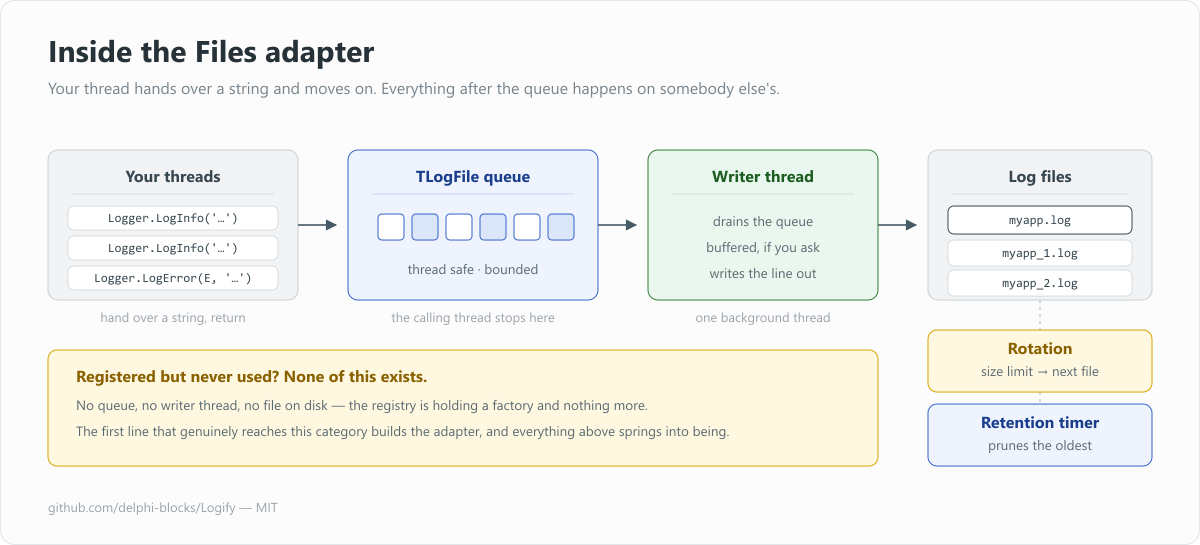
Everything to the right of the queue belongs to another thread, and none of it exists until the first line is logged.
TLoggerAdapterRegistry.Instance.RegisterFactory(
  TLogifyAdapterFilesFactory.CreateAdapterFactory('file',
    procedure(var AConfig: TFileLogConfig)
    begin
      AConfig.Level := TLogLevel.Debug;
      AConfig.SetLogName('myapp');
      AConfig.Path := './logs';
      AConfig.Ext := 'log';
      AConfig.Append := True;
    end
  ));
Remember that none of that machinery starts until something actually logs to the category: the factory is registered, the thread is not running, the file is not open.
Syslog
The Syslog adapter is the newest arrival, and it goes through libc syslog(3), a binding the Delphi RTL does not ship, so Logify includes one. Records land wherever the machine already sends them: journald under systemd, rsyslog otherwise, and onward to a central collector if one is configured.
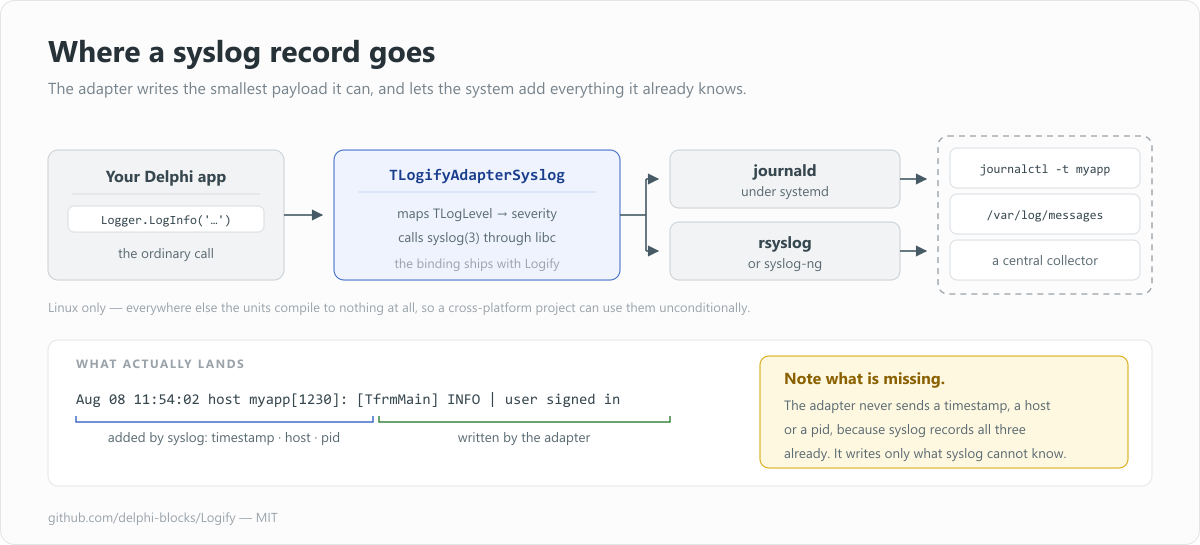
You write one line; the daemon supplies the timestamp, the host and the pid before it stores it.
TLoggerAdapterRegistry.Instance.RegisterFactory(
  TLogifyAdapterSyslogFactory.CreateAdapterFactory('syslog',
    procedure (var AConfig: TSyslogConfig)
    begin
      AConfig.AppName := 'myapp';
      AConfig.Facility := TSyslogFacility.Local6;
      AConfig.Options := [TSyslogOption.PID];
      AConfig.Level := TLogLevel.Debug;
      AConfig.SplitLines := True;
    end
  ));
Aug 08 11:54:02 host myapp[1230]: [TfrmMain] INFO | user signed in
Note what is not in that payload: no timestamp, no host, no pid. Syslog records all of it already, so the adapter writes only what syslog cannot know. It is Linux only, but on other platforms the units compile to nothing at all, so a cross-platform project can uses them unconditionally. There is a full guide covering facilities, rsyslog routing, journalctl and troubleshooting.
If you are writing a Delphi service that will live under systemd, this pairs naturally with what I covered in Building a real Linux daemon with Delphi.
Writing your own adapter
Sooner or later you will have a backend nobody has written an adapter for: a database table, a REST endpoint, a message queue. There are two routes, and you pick by how capable the backend is.
If the backend does no formatting and no level handling, descend from TLoggerAdapterHelper and override two methods. Filtering and the standard layout come for free:
TMyAdapter = class(TLoggerAdapterHelper, ILoggerAdapter)
protected
  procedure InternalLog(const AMessage, AClassName: string; AException: Exception; ALevel: TLogLevel); override;
  procedure InternalRaw(const AMessage: string; ALevel: TLogLevel); override;
end;
If the backend already formats and filters, implement ILoggerAdapter directly, map the levels yourself and handle TLogLevel.Off explicitly. Call the public GetFullExceptionInfo so exceptions still render the way the rest of the library renders them. This is the route the Syslog, LoggerPro and QuickLogger adapters take.
Either way, ship a factory beside it, so registration looks like every other adapter:
TMyAdapterFactory = class(TLoggerAdapterFactory)
public
  class function CreateAdapterFactory(const AName: string; ALevel: TLogLevel): TMyAdapterFactory;
  function CreateLoggerAdapter: ILoggerAdapter; override;
end;
That factory is what earns your adapter the same laziness as the built-in ones: registered at startup, constructed only if a line ever needs it.
Platforms, tests, and where to get it
Logify needs Delphi 12 Athens or later; the Syslog adapter additionally needs the Linux64 toolchain. Every unit in Source compiles for both Windows (32 and 64 bit) and Linux 64 bit, with the platform-specific pieces behind {$IFDEF}. There is a runtime package in Packages, but the demos and tests reference the sources through their search path, so nothing has to be installed to try it out.
The test suite uses DUnitX and covers the level ordering, the global logger, category isolation, registry lookup and caching and reset, adapter filtering, message and exception formatting, the syslog protocol mapping, and concurrency: cold-start adapter creation, the lazily built global logger, and registry churn under load.
The code is MIT licensed and lives here:
github.com/delphi-blocks/Logify
There are ready-to-run demos for the console, for VCL, and for syslog on Linux. Clone it, open one, press a button, and watch a form that logs to a memo turn into a form that logs to a rotating file without a single line of the form changing.
Conclusions
If you take one idea away from these two articles, let it be the shift in phrasing. Stop writing code that says "I use this logger". Start writing code that says "I need a logger", and let something else decide, much later and somewhere else entirely, whether that need gets met.
Issues, pull requests and new adapters are very welcome.