






Logify: a meta-logger for Delphi Part 1
8 ago 2026 - 8 Min Read

Paolo Rossi
Web & Delphi Developer
Logify: a meta-logger for Delphi
Every Delphi project I have worked on eventually grows a logger. And every Delphi project I have worked on eventually regrets which logger it grew.
The problem is not the logging libraries: we have excellent ones, LoggerPro and QuickLogger among them. The problem is that the moment you write MyLogger.Log('...', INFO) in a business unit, that unit stops being about business and starts being about that specific library. It carries a uses clause into every project it visits, it needs that library on the search path to compile, and it needs it configured at runtime to be useful.
Logify is my answer to that. It is a meta-logger: a thin interface layer that your code talks to, with the real backend plugged in somewhere else entirely: at composition time, in one place, or not at all.
This first part is about why the thing exists, the problem it removes, and then about its core API: the three interfaces, the levels, how you get hold of a logger and how you register a backend. The second part covers the adapters that ship in the box (console, files, buffer, syslog) and how to write your own.
Two loggers, two shapes
Take any two of the good Delphi loggers and write the same trivial thing with each. Here is a button handler with LoggerPro:
uses
  LoggerPro, LoggerPro.FileAppender;

var
  Log: ILogWriter;

procedure TfrmMain.FormCreate(Sender: TObject);
begin
  Log := BuildLogWriter([TLoggerProFileAppender.Create]);
end;

procedure TfrmMain.btnTestClick(Sender: TObject);
begin
  Edit1.Text := 'Paolo';
  Log.Info('Setting the value of Edit1', 'ui');
end;
And here is the same handler with QuickLogger:
uses
  Quick.Logger, Quick.Logger.Provider.Files;

procedure TfrmMain.FormCreate(Sender: TObject);
begin
  Logger.Providers.Add(GlobalLogFileProvider);
  GlobalLogFileProvider.FileName := '.\myapp.log';
  GlobalLogFileProvider.LogLevel := LOG_ALL;
  GlobalLogFileProvider.Enabled := True;
end;

procedure TfrmMain.btnTestClick(Sender: TObject);
begin
  Edit1.Text := 'Paolo';
  Log('Setting the value of Edit1', etInfo);
end;
Both libraries are excellent, both do a great deal more than this, and neither snippet is doing anything clever. Look at how little survives the move anyway. One hands you an ILogWriter that you hold on to; the other gives you a global Log routine. One takes a tag as its second argument; the other takes an event type. The level is Info here and etInfo there. The setup has nothing in common beyond the fact that there is some.
And that is the cost of the choice: not the library, but the shape it presses into your source. Every call site you write is written in one dialect, so the day you want the other dialect, or a third one, or none at all, you are editing call sites instead of editing configuration.
The unit that travels
Here is a situation I hit constantly. You have a form, a data module or a service unit, something you wrote once and now want to reuse in a second project:
uses
  MyBeautifulLoggerUnit;

procedure TfrmMain.btnTestClick(Sender: TObject);
begin
  if CheckBox1.Checked then
  begin
    Edit1.Text := 'Paolo';
    MyLogger.Log('Setting the value of Edit1', INFO);
  end;
end;
The unit works beautifully in the original application, which has that logger configured and writing to a nice rotating file. The new project does not need logging at all. What are your options?
- Strip out the log lines. Now the two copies of the unit have diverged, and you have thrown away information you may want back.
- Wrap them in
{$IFDEF}. The unit becomes noisy, and you have to remember to define the symbol in the right build configurations forever. - Configure the exact same logger you do not need, dragging in a third-party dependency to service a feature nobody asked for.
All three require touching the source code, and none of them survive the unit being shared back to the original project.
It is not just a uses clause
The compile-time dependency is the one you notice first, because it stops the build and you deal with it. The runtime dependency is worse, precisely because it does not stop anything.
A unit that logs does not merely reference a logger. It expects one to have been created and configured, by somebody, before the unit runs, and that expectation travels with it into every context that ever hosts it:
- A test project. You want to exercise the business logic in that unit, so you have to stand up the very same logger the application stands up. Otherwise the calls reach an unconfigured global, and what happens then depends on the library: a silent no-op, an access violation, or a log file quietly appearing in your test output directory. Your DUnitX project grows a
usesclause, a setup block, appenders and a file to clean up afterwards, all to test a method that has nothing to do with logging. - A console utility that borrows one unit from the desktop application and now has to reproduce that application's logging configuration just to start.
- A second application whose logging policy is genuinely different (another destination, another level, another retention) and which has to satisfy the first application's assumptions anyway.
None of those three want logging. All of them have to configure it. That is the part that annoyed me enough to write a library: the dependency is not really on a unit, it is on a ceremony, and there is no uses clause to point at when you want to remove it.
The Logify version
uses
  Logify;

procedure TfrmMain.btnTestClick(Sender: TObject);
begin
  if CheckBox1.Checked then
  begin
    Edit1.Text := 'Paolo';
    Logger.LogInfo('Setting the value of Edit1');
  end;
end;
Copy that unit into a project that has never heard of logging. It compiles: Logify has no dependencies beyond the RTL. It runs, and LogInfo does nothing. No file is opened, no thread is spawned, no console appears. Six months later you decide you do want logs after all, so you add three lines to your .dpr and every call you already wrote springs to life.
The ceremony disappears the same way. An unconfigured Logify is a working Logify, so the test project adds one unit to its search path and nothing else: no appenders, no setup block, no stray file to delete afterwards. And on the day you want to assert on what a method logged, you register the Buffer adapter in your test setup and read the lines straight back out.
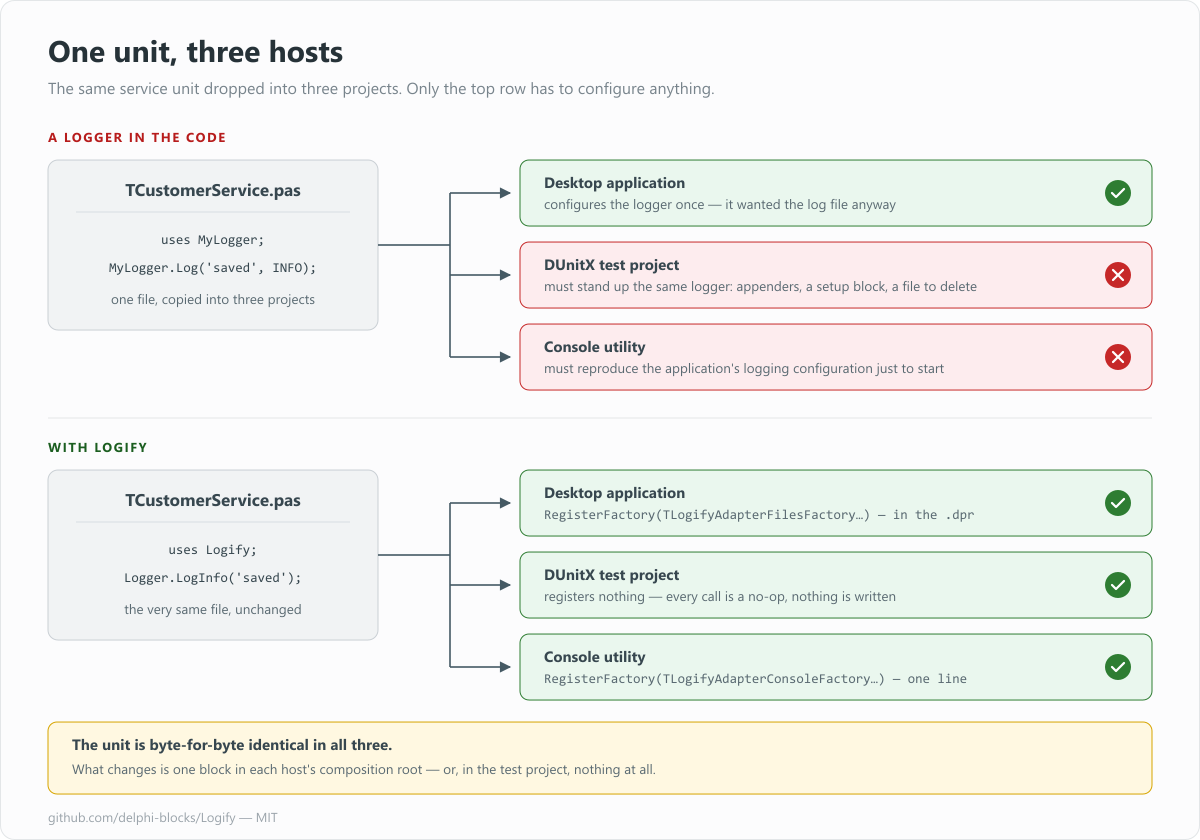
The same source file in six projects. In the bottom row it never had to change, and one of the three hosts configures nothing at all.
That is the whole point of the library, and it is worth saying plainly: Logify's headline feature is not logging. It is doing absolutely nothing, until told otherwise.
Three interfaces, and that is all
The architecture is deliberately small. There are exactly three interfaces, all in Logify.pas. Here is the whole thing on one page: registration along the top, and what a single log call actually does underneath:
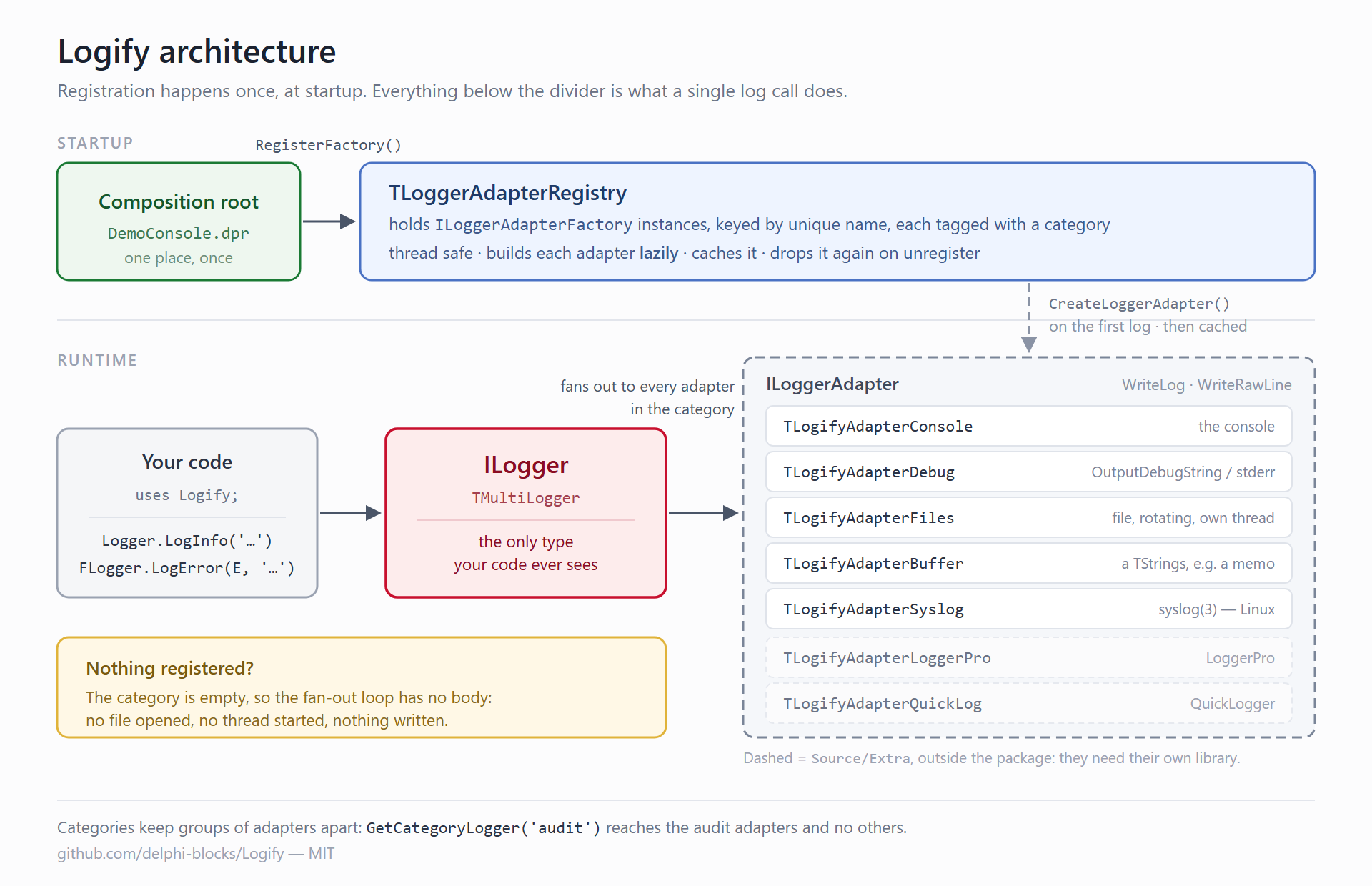
Your code only ever touches the red box. Everything to the right of it is decided elsewhere, or not at all.
ILogger: what your code sees
The only type your application ever touches. It offers Log overloads plus one method per level, in three flavours: a plain message, a Format-style message with arguments, and a message carrying an exception.
Logger.LogInfo('a message');
Logger.LogInfo('the value is %d', [42]);
Logger.LogError(E, 'the operation failed');
Logger.LogRawLine('=== a banner ===', TLogLevel.Info);
LogRawLine asks the backends to write the text exactly as given, with no timestamp, level or class decoration, which is useful for banners and separators.
The implementation behind the interface is a multi-logger: one call fans out to every adapter registered in its category. Register a console adapter and a file adapter and each line goes to both, without your code knowing there are two. Register none and the loop body simply never executes. The no-op behaviour is not a special case bolted on: it is what an empty list naturally does.
ILoggerAdapter: what a backend implements
Two methods, mirroring the two ways a message can be written:
procedure WriteLog(const AClassName, AMsg: string; AException: Exception; ALevel: TLogLevel);
procedure WriteRawLine(const AMsg: string; ALevel: TLogLevel);
That is the entire contract a logging backend has to satisfy to join the party.
ILoggerAdapterFactory: what you actually register
This is the piece that makes the "does nothing" promise real. You do not register adapters, you register factories. TLoggerAdapterRegistry holds them, keyed by a unique name, and builds each adapter lazily, the first time something genuinely logs to that category, then caches it.
So a configured file logger in an application that never logs never opens a file, never starts its writer thread, never touches the disk. The configuration is there, ready, and completely inert.
The registry is thread safe, and an adapter is created exactly once no matter how many threads race to log first.
Log levels
TLogLevel = (Trace, Debug, Info, Warning, Error, Critical, Off);The unit compiles with {$SCOPEDENUMS ON}, so you always write TLogLevel.Info. The ordering is meaningful and is what filtering relies on: an adapter configured at Warning silently drops everything below it. Off is never written by anybody.
Getting a logger
The quickest route is the global Logger function, which talks to the default category:
uses Logify;

Logger.LogInfo('Hello');
If you want the originating class stamped into every line, and you usually do, ask TLoggerManager for a logger and keep it in a field:
FLogger := TLoggerManager.GetLogger(Self.ClassType);   // by instance class
FLogger := TLoggerManager.GetLogger<TfrmMain>;         // by type
FLogger := TLoggerManager.GetLogger('TfrmMain');       // by name
Adapters that use the built-in formatting produce lines like this:
2026-08-08T11:54:02.318 12480 [TfrmMain] INFO | user signed in
That is LOG_TEMPLATE = '%s %s [%s] %s | %s' (ISO 8601 timestamp, thread id, class, level, message), with the exception class, message and stack trace appended when you log one. Nested exceptions are walked to the bottom of the chain.
Categories
A category is an independent group of adapters. Register a factory under a category, ask for a logger bound to it, and what you log there reaches those adapters and no others:
TLoggerAdapterRegistry.Instance.RegisterFactory('audit',
  TLogifyAdapterFilesFactory.CreateAdapterFactory('audit-file', AConfig));

FAudit := TLoggerManager.GetCategoryLogger<TfrmMain>('audit');
FAudit.LogInfo('user signed in');   // only the audit adapters see this
This is how you keep an audit trail out of your debug noise without inventing a filtering language.
Registering adapters
Registration happens once, at startup, in the composition root: your .dpr, or a form's OnCreate if you like living dangerously:
TLoggerAdapterRegistry.Instance.RegisterFactory(
  TLogifyAdapterConsoleFactory.CreateAdapterFactory('console', TLogLevel.Info));
Adapters with more to configure than a level take an anonymous configuration method:
TLoggerAdapterRegistry.Instance.RegisterFactory(
  TLogifyAdapterFilesFactory.CreateAdapterFactory('file',
    procedure(var AConfig: TFileLogConfig)
    begin
      AConfig.Level := TLogLevel.Debug;
      AConfig.SetLogName('myapp');
      AConfig.Path := './logs';
      AConfig.Ext := 'log';
      AConfig.Append := True;
    end
  ));
The registry can be taken apart again, which matters for tests and for applications that reconfigure logging while running:
TLoggerAdapterRegistry.Instance.UnregisterFactory('console');
TLoggerAdapterRegistry.Instance.UnregisterCategory('audit');
TLoggerAdapterRegistry.Instance.Clear;
Unregistering also drops the cached adapter, so registering the same name again builds a fresh one. Releasing an adapter runs its destructor, which is how the file logger stops its threads and the syslog adapter closes its session.
Conclusions
Three interfaces, seven levels, one registry: that is the whole of Logify's core. Your units say "I need a logger" and nothing more, and the answer to that request (a console, a rotating file, a memo on a form, the system journal, or silence) is given once, somewhere else, by whoever assembles the application.
The code is MIT licensed and lives at github.com/delphi-blocks/Logify.
In the next part I will go through the adapters that come in the box (console, debug, files, buffer, syslog, plus bridges to LoggerPro and QuickLogger) and show how to write your own for a backend nobody has covered yet.