






JSON Serialization with Neon - Part 2
Invalid DateTime - 16 Min Read

Paolo Rossi
Web & Delphi Developer
JSON Serialization with Neon - Part 2
In the first part of this series we saw what Neon is, why I wrote it, and how to serialize an object or a record with a single line of code. That's the easy 80% of the job.
This part is about the other 20%: what to do when the default output is almost right but not quite. Your REST client wants camelCase and your Delphi class uses PascalCase. A password field must never leave the process. A nested object should be flattened into its parent. An enum needs to travel as "High Speed" and not as hsHigh. This is where a serialization engine either helps you or forces you to write a translation layer by hand, and it's the part of Neon I'm most happy with.
Almost everything below is driven by two things: the configuration object and the attributes. Neither of them requires you to change the way your classes work.
Configuration
Every TNeon method we used in part 1 has an overload that takes an INeonConfiguration. You build one with a fluent interface starting from TNeonConfiguration.Default:
var
  LConfig: INeonConfiguration;
begin
  LConfig := TNeonConfiguration.Default
    .SetMemberCase(TNeonCase.CamelCase)
    .SetMembers([TNeonMembers.Properties])
    .SetIgnoreFieldPrefix(True)
    .SetPrettyPrint(True);

  memoLog.Lines.Text := TNeon.ObjectToJSONString(Language, LConfig);
end;
Build the configuration once, keep it somewhere, and pass it to every call. In a REST server you typically have exactly one configuration for the whole application, which is how WiRL uses Neon.
Naming
SetMemberCase is the setting you will reach for first, because it's the one that makes Delphi code and JSON conventions agree without renaming anything:
TNeonCase |
FirstName becomes |
|---|---|
Unchanged |
FirstName |
LowerCase |
firstname |
UpperCase |
FIRSTNAME |
PascalCase |
FirstName |
CamelCase |
firstName |
SnakeCase |
first_name |
KebabCase |
first-name |
ScreamingSnakeCase |
FIRST_NAME |
If your house style isn't in that list, TNeonCase.CustomCase plus SetMemberCustomCase lets you pass your own function and do whatever you want with the member name.
A related one is SetIgnoreFieldPrefix(True): when you serialize fields rather than properties, it drops the Delphi F prefix, so FFirstName doesn't turn into an ugly "FFirstName" in the JSON.
Which members get serialized
By default Neon looks at properties. SetMembers changes that, and SetVisibility decides how far into the class Neon is allowed to look:
LConfig := TNeonConfiguration.Default
  .SetMembers([TNeonMembers.Fields])
  .SetVisibility([mvPublic, mvPublished]);
This pair is what lets Neon work on classes that were never designed to be serialized - a PODO with public fields and no properties at all is fine.
Two more settings trim what gets serialized:
SetIgnoreReadOnlyProps(True)skips properties without a setter. Handy: a read-only property serializes fine but has nowhere to go on the way back.SetIgnoreMembers(andAddIgnoreMembers) take a list of member names to skip everywhere, which is the quickest way to drop aPasswordor anIdacross a whole object graph without touching a single class.
Output settings
The rest of the configuration is about the JSON itself:
SetPrettyPrint(True)- indented output. Nice while developing, turn it off on the wire.SetMemberSort-Rtti(declaration order),RttiReverse,AlphaorAlphaReverse.SetMapSortdoes the same for dictionary keys. Alphabetical output makes diffing JSON in tests a lot easier.SetEnumAsInt(True)- enums as ordinal numbers instead of names. Compact, but brittle if you ever reorder the enum. I'd avoid it in a public API.SetUseUTCDate(True)- controls whether dates are written as UTC.SetStrictTypesandSetRaiseExceptions- how forgiving the engine is when the JSON doesn't match the Delphi type. Strict is what you want in tests; forgiving is often what you want against a third-party API you don't control.SetAutoCreate(True)- Neon creates nil sub-objects while deserializing (there's also a per-member attribute for this, see below).
Attributes
Configuration is global. Attributes are how you say something about one class or one member, and they're the reason Neon can usually be bent into shape without a DTO layer.
You need nothing more than uses Neon.Core.Attributes;.
Renaming: NeonProperty
The workhorse. The Delphi member keeps its name, the JSON gets another:
type
  TPerson = class
  private
    FFirstName: string;
  public
    [NeonProperty('given_name')]
    property FirstName: string read FFirstName write FFirstName;
  end;
[NeonProperty] wins over the configuration's case algorithm, so use it for the handful of members that don't follow your general rule.
Leaving things out: NeonIgnore and friends
Three levels, from narrow to wide:
type
  // ignore one member, both when reading and writing
  TUser = class
  private
    FPassword: string;
  public
    [NeonIgnore]
    property Password: string read FPassword write FPassword;
  end;

  // ignore a list of members, declared on the class
  [NeonIgnoreProperties('Password,InternalId')]
  TUser2 = class
    // ...
  end;

  // ignore this type everywhere it appears
  [NeonIgnoreType]
  TInternalState = class
    // ...
  end;
[NeonIgnoreType] is the one people discover late and then use constantly: put it on your logging or cache helper class and it disappears from every JSON in the application, no matter how deeply it's nested.
Conditional output: NeonInclude
[NeonIgnore] is absolute. [NeonInclude] is the interesting one, because it decides at runtime based on the value:
type
  TCustomer = class
  public
    [NeonInclude(IncludeIf.NotEmpty)]
    property Notes: string read FNotes write FNotes;

    [NeonInclude(IncludeIf.NotDefault)]
    property Discount: Double read FDiscount write FDiscount;
  end;
The IncludeIf values are Always, NotNull, NotEmpty, NotDefault and CustomFunction. This is how you get a compact JSON without empty strings, zeros and nulls cluttering the payload - which matters more than it sounds when you're sending thousands of records.
CustomFunction hands the decision to a method on your own class, called ShouldInclude unless you name another one:
type
  TFilterClass = class
  private
    [NeonInclude(IncludeIf.CustomFunction)]
    Field2: TRect;

    function ShouldInclude(const AContext: TNeonIgnoreIfContext): Boolean;
  end;

function TFilterClass.ShouldInclude(const AContext: TNeonIgnoreIfContext): Boolean;
begin
  // AContext.MemberName is the member being considered
  // AContext.Operation is Serialize or Deserialize
  Result := AContext.Operation = TNeonOperation.Serialize;
end;
The context carries the operation, so a member can be write-only or read-only in JSON terms: accept a password on the way in, never send it back out. That's a very common REST requirement and it costs you four lines.
Flattening: NeonUnwrapped
[NeonUnwrapped] merges a nested object's members into the parent, and puts them back where they belong when deserializing:
type
  TUnwrappedClass = class
  published
    property Name: string read FName write FName;
    property Age: Integer read FAge write FAge;

    [NeonUnwrapped]
    property Wrapped: TSubObject read FWrapped write FWrapped;
  end;
Instead of the nested shape you'd expect, you get a flat object:
{
  "Name": "Paolo",
  "Age": 27,
  "First": 42,
  "Second": "2022-11-22T10:00:00.000Z"
}
This one exists because the JSON you have to produce is often flatter than the object model you want to keep in Delphi. Without it you'd be writing a DTO for exactly this reason.
Enums: NeonEnumNames
Delphi enum identifiers make poor JSON values. [NeonEnumNames] maps them, in declaration order, to strings you choose:
type
  [NeonEnumNames('Low Speed,Medium Speed,High Speed')]
  TEnumSpeed = (Low, Medium, High);
Now TEnumSpeed.High travels as "High Speed" - and comes back as TEnumSpeed.High. Combined with leaving SetEnumAsInt off, this keeps your API readable and refactor-proof.
Per-type overrides: NeonMembers and NeonVisibility
The configuration sets the policy for the whole application; these two attributes make an exception for a single class or record:
type
  [NeonMembersSet([TNeonMembers.Fields])]
  [NeonVisibility([mvPublic])]
  TMyRecord = record
    // ...
  end;
Useful when one legacy class in your model doesn't follow the same conventions as everything else.
Who creates the object: NeonAutoCreate
Everything so far was about serialization. This one is about the way back, and it answers a question every deserializer has to answer: when the JSON contains a nested object but the Delphi member holding it is nil, who creates the instance?
By default, nobody - Neon won't silently allocate objects behind your back. [NeonAutoCreate] says "for this member, go ahead":
type
  TOrder = class
  private
    FCustomer: TCustomer;
  public
    [NeonAutoCreate]
    property Customer: TCustomer read FCustomer write FCustomer;
  end;
The class needs a parameterless constructor, since that's all Neon has to work with. The attribute is the per-member equivalent of the global SetAutoCreate(True) we saw in the configuration - the two are OR'ed together, so the attribute can only turn creation on for a member, never off.
Two conditions explain most of the "why didn't it create my object?" cases: the member must actually be nil (an object you already created is filled in, not replaced), and the JSON node must have something in it. An empty JSON object leaves your nil alone.
Choosing the class: NeonFactory and NeonItemFactory
[NeonAutoCreate] calls a parameterless constructor on the declared type. That is not always enough. Two cases in particular:
- the object needs something passed to its constructor;
- the declared type is a base class and the JSON decides which descendant you actually want.
The second one is polymorphic deserialization, and it's usually where serialization libraries reach for a $type metadata field. As I wrote in part 1, that's exactly what I didn't want Neon to do - the JSON should be plain data. So instead, Neon lets you take over the decision.
You inherit from TCustomFactory and implement one method, which receives the target type and the JSON node and returns the instance:
uses
  Neon.Core.Persistence;

type
  TShapeFactory = class(TCustomFactory)
  public
    function Build(const AType: TRttiType; AValue: TJSONValue): TObject; override;
  end;

function TShapeFactory.Build(const AType: TRttiType; AValue: TJSONValue): TObject;
var
  LKind: string;
begin
  // the discriminator is one of your own fields, not injected metadata
  LKind := AValue.GetValue<string>('Kind', '');

  if SameText(LKind, 'circle') then
    Result := TCircle.Create
  else if SameText(LKind, 'square') then
    Result := TSquare.Create
  else
    Result := TShape.Create;
end;
Then you point the member at the factory:
type
  TDrawing = class
  public
    [NeonFactory(TShapeFactory)]
    property Shape: TShape read FShape write FShape;

    [NeonItemFactory(TShapeFactory)]
    property Shapes: TObjectList<TShape> read FShapes write FShapes;
  end;
The important detail is what happens after Build returns: Neon re-reads the RTTI of the object you actually created and carries on deserializing that type. So the TCircle gets its circle members populated even though the property is declared as TShape.
[NeonItemFactory] is the same idea applied to the items of a collection, and it's called once per item - which means a single JSON array can produce a genuinely heterogeneous list, each element decided by its own content.
Like [NeonAutoCreate], factories only come into play when the member is nil; if a factory is present it takes precedence over auto-creation.
Passing JSON through untouched: NeonRawValue
Sometimes a string member already contains JSON - it came from a database column, another service, or a cache - and the last thing you want is for it to be escaped into a string full of \". [NeonRawValue] splices it into the output as-is:
type
  TResponse = class
  public
    property Id: Integer read FId write FId;

    [NeonRawValue]
    property Payload: string read FPayload write FPayload;
  end;
With Payload holding {"a":1} you get the nested object, not a quoted string:
{
  "Id": 7,
  "Payload": { "a": 1 }
}
It works in both directions, which is the part that makes it genuinely useful: deserializing hands you back the raw JSON text of that node as a string, so a payload you don't want to model in Delphi can travel in, sit in a string, and go back out unchanged.
One warning: on the way out the content is parsed, and invalid JSON raises an exception rather than producing a broken document. That's the right behaviour, but it does mean an unvalidated string from elsewhere can make serialization fail - so treat [NeonRawValue] members as something you control.
Bytes on the wire: NeonFormat
[NeonFormat] carries a format string that a serializer can act on. Today it's the TBytes serializer that reads it, and the interesting thing is which way the default falls:
type
  TDocument = class
  public
    // no attribute: Base64 string - the default
    property Thumbnail: TBytes read FThumbnail write FThumbnail;

    [NeonFormat('native')]
    property Signature: TBytes read FSignature write FSignature;
  end;
TBytes is Base64 by default. You add [NeonFormat('native')] to opt out and get the plain JSON array of numbers instead:
{
  "Thumbnail": "SGVsbG8gV29ybGQ=",
  "Signature": [72, 101, 108, 108, 111]
}
Base64 is the right default - it's roughly a third of the size of the array form and it's what every other platform expects for binary - but the attribute is there to turn it off, not on, if you're reading someone else's JSON that spells bytes out as numbers.
NeonSerialize and NeonDeserialize
These two are meant to point a single member at a specific custom serializer class, and they're the natural bridge to the next article.
A word of warning before you use them, though: in the current code the engine selects custom serializers by type, from the registry you fill with Config.RegisterSerializer. These two attributes are parsed and exposed on the RTTI object, but nothing in the serializer at present goes looking for them - so annotating a member with [NeonSerialize(TMySerializer)] doesn't change the output today. Register the serializer for the type instead, and you'll get the behaviour you want.
I'm pointing this out because it's the kind of thing that costs an hour of debugging. It's also on my list to wire up properly - and either way, custom serializers are the subject of part 5, where I go through the registry, CanHandle, and the two methods you have to implement.
Nullable types
JSON distinguishes between "absent", "null" and "zero". Delphi's value types don't - an Integer is always something, and 0 is indistinguishable from "not set". If you've ever written REST code against a database with nullable columns, you know exactly how much trouble this causes.
Neon ships Nullable<T> in Neon.Core.Nullables, with aliases for the common cases:
uses
  Neon.Core.Nullables;

type
  TClassOfNullables = class
  private
    FName: NullString;
    FAge: NullInteger;
    FBirthDate: NullDateTime;
  public
    [NeonInclude(IncludeIf.Always)]
    property Name: NullString read FName write FName;

    [NeonInclude(IncludeIf.NotNull)]
    property Age: NullInteger read FAge write FAge;

    [NeonInclude(IncludeIf.NotNull)]
    property BirthDate: NullDateTime read FBirthDate write FBirthDate;
end;NullString, NullBoolean, NullInteger, NullDouble and NullDateTime are all there, and Nullable<T> works with your own types too - Nullable<TEnumSpeed> is perfectly fine. The record has HasValue, IsNull, Clear, GetValueOrDefault and a set of implicit operators, so in most of your code it reads like the plain type.
The reason I'm showing it next to [NeonInclude] is that the two are designed to work together. IncludeIf.Always on a nullable emits an explicit null; IncludeIf.NotNull omits the member entirely. Those are two genuinely different messages to send to an API - "set this field to null" versus "don't touch this field" - and with these two pieces you can say either one.
What's next
Three of the features I've only pointed at here deserve their own articles, and they've all been written since - they're together in part 5:
- Custom serializers. When attributes aren't enough, you inherit from
TCustomSerializer, implementCanHandleplusSerializeandDeserialize, and register the class withConfig.RegisterSerializer. From then on Neon uses your code every time it meets that type - which, as noted above, is how you get a custom serializer applied today. - Configuration by code. Everything done with attributes above can also be done from the outside, through
Config.Rules.ForClass<T>andForRecord<T>. That matters when the classes aren't yours to annotate - types from a third-party library, or generated code you don't want to edit. - JSON Schema and OpenAPI. Neon generates JSON Schema (Draft-07 and 2020-12) from your Delphi types, which is what makes automatic OpenAPI documentation possible with OpenAPI for Delphi.
Part 5 also covers everything that has landed in Neon since these lines were written - the JSON Schema validator, the entity generator that turns a JSON document back into Delphi code, the profiler and the tag system - and the benchmark numbers I promised in part 1 are in part 3.
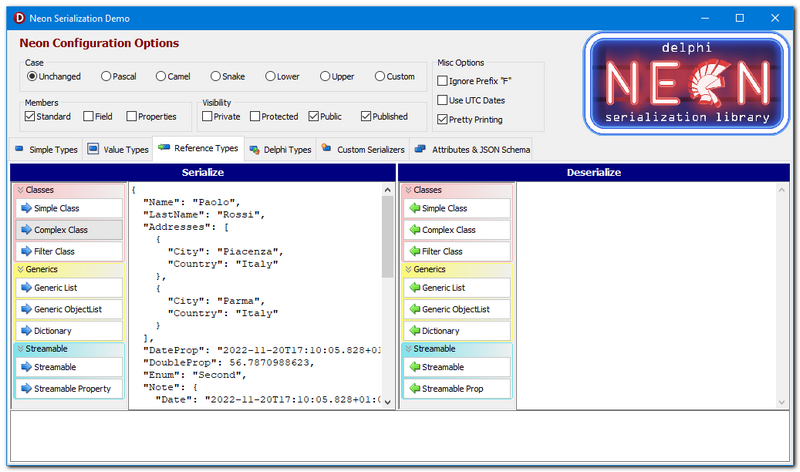
In the meantime, the fastest way to get a feel for all of this is the Main Demo in the repository: every attribute and every configuration setting is in there, with a live JSON preview.
Neon is on GitHub: github.com/paolo-rossi/delphi-neon.
Stay tuned!